FAQ #4 - Credit and Referral Credit
Add credit to any member’s account with the Credit button  and it will be immediately available to use.
Using the Credit to Account feature allows you to add a credit balance to a member's account. Credit can be used to purchase additional goods and services at your center or be used to prepay a recurring membership before the invoice is generated.
When you add a Credit to Account, a Credit Balance will appear under the member’s billing tab. The credit can be used to pay or purchase later during Checkout > Add Payment Method > select Customer Account to pay with.
The charge will be made against the credit balance available. Additionally, if a member paid the Credit to Account as a prepayment of dues, and they are set to auto-bill, when their next dues payment comes due, the credit to account will be applied automatically unless otherwise indicated.
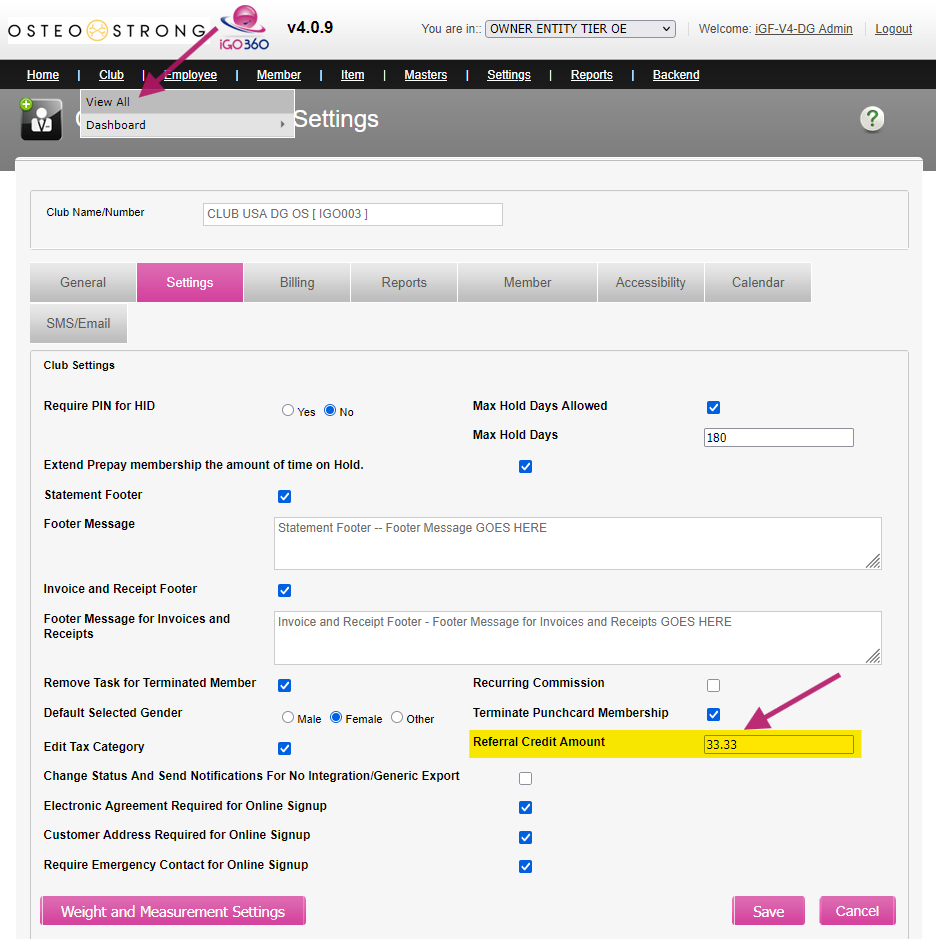
Login to OE > Club > View All > click the Club Number > Settings > Referral Credit Amount and Save.
IMPORTANT NOTE: This credit is only given if the referral is recorded at new member’s signup time, referrals entered later will have to be manually credited.
For credit to be applied automatically to the membership dues, make sure the option is set to YES. It is set to YES by default when adding a new member. If not, you can change it > click the Edit Member button > set to YES at the bottom of the form > Save.
